Gamcheon Village

-
Game: Ground Zero
-
Genre: Third Person (Fixed Perspective) Survival Horror
-
Type: Singleplayer
-
Created as Lead Level Designer at Malformation Games
-
Available on: Steam, PS5, XBOX Series X|S
-
Level Development Time: 6+ months
-
Engine: Unreal Engine 5
-
Team Size: between 6-10
-
Length: about 1 hour


Gamcheon Village is the primary location featured in Chapter 2 of Ground Zero's main story. It is a sprawling coastal village that contains multiple subareas and is one of the most iconic regions of the game.
On her way to Yeongdo Lighthouse, Seo-Yeon stops in the town to investigate the strange growths and look for survivors.
I chose to feature this level because it showcases my ability to create large non-linear environments with a complex layout that can be simplified through built-in shortcuts. I also feel it adequately demonstrates my knowledge and understanding of player leading elements and encouraging exploration.
————————————————————————————————————————————————————————————————
Production
From the very onset of Ground Zero's development, one of the main locations the team discussed having in the game was a coastal village.
The entire first half of the game takes place in the Busan region, so I got to work researching villages in that region to use as a basis for the level. I eventually settled on the Gamcheon Culture Village, a popular tourist destination in the area. I was drawn to Gamcheon due to its colorful nature and thought that it would really help the game stand out from other similar titles where the color palette tends to be more dark and muted. I also adored how it was nestled into a valley, giving it a very irregular and asymmetric street layout.
The primary design goals I had were to create an intertwining layout with non-linear flow that also has lots of explorable pockets, built-in shortcuts / loops, a good amount of variation in height, a good mixture of indoor/outdoor sections, and most importantly, a familiar old school survival horror feeling. For that, I turned to one of my childhood classics, the original Resident Evil 3 for the PS1. I studied that game's levels and tried to design my layout to evoke a similar feeling as the original Raccoon City while still feeling like Gamcheon.
Making this level was a massive coordination effort between myself, the Game Director, and our Environment Artist. I specifically wanted native South Koreans and anyone who had visited the real Gamcheon Village to be able to recognize the level. As such, I worked with our Environment Artist to make many custom meshes and props that are based on the real-life features and landmarks of the village. Our Environment Artist also assisted me with Level Art, and I often mentored and provided feedback for his work.
————————————————————————————————————————————————————————————————
Design
References

Real-life street layout of Gamcheon Village

An assortment of buildings, with very diverse colors

The entrance to Gamcheon Village, which is the focal point of the level

An iconic fish mural that was remade in-game
Topdowns


A more detailed topdown of the central section of the village
An initial topdown of the entire level, loosely based on the real-life street layout
Blockout

Early geometry of the front entrance to the village. The terrain is made using Unreal Landscapes

Second iteration of the village entrance area, now with basic lighting

Bird's eye view of the complete level blockout, with placeholder buildings
Final Result

Village entrance with the iconic Gamcheon archway and tourist information building

The fish mural

Gamcheon streets
————————————————————————————————————————————————————————————————
Level Flow

1. Enter the village

2a. Find the oil

2b. Find the oil additive

3. Power up and lower the forklift

4. Get the Lion Key from the claw machine

5. Navigate the sewers

6a. Eliminate the Dog Cluster boss and collect Serpent Key Piece A

6b. Collect Serpent Piece B from the subway

7. Exit through the Serpent Gate
————————————————————————————————————————————————————————————————
Gameplay
Non-linearity
Non-linear gameplay is a staple of the old school survival horror experience. After being presented with an objective, players are encouraged to explore and inspect the environment to find clues, solve puzzles, and find items to help them progress.
One common pitfall with non-linear design is seen when too many options are presented too quickly. This often results in the player feeling overwhelmed with choices and can make them forget the overall goal or get lost.
To mitigate this, I designed the layout and gameplay flow with physical "chokes" in the progression. For example, at the beginning of the level, the player is injected into a rather large area with 3 to 4 different side routes. However, the main route that leads to the end of the level is gated by a puzzle that must be solved with information / items gathered by exploring the side paths. After completing the forklift puzzle in area A, players can access area B, with new side paths and yet another blocker - this time a locked gate.
This gated non-linear flow stops the player from wandering too far away from the primary objective, while still having the freedom to explore at their leisure.

The entrance area of Gamcheon Village split into 3 subareas, with physical blockers between each
Shortcuts
Another staple of survival horror gameplay is backtracking. It's often the case that the player has to return to previously-visited areas to use new items or pick up items they left behind. They may also want to return to a save room to save their progress, which are only placed in specific areas of the level in Ground Zero.
With a complex layout like the one in Gamcheon Village, this backtracking can become tedious and result in players easily getting lost.
In the diagram to the right, take particular note of the long route that connects areas B --> C --> D --> E. This route passes through several areas and takes anywhere from 3 to 5 minutes to traverse. By the time the player makes it to area E, getting back to area B would be quite tedious. However, a door, which can only be unlocked from area E, opens up a direct line from E <--> B.
This can also be observed with the connecting shortcut between areas F and A, essentially giving a direct path between the beginning and end areas of the level.
This ensures that the player has to travel the intended path at least once, and then rewards them with more freedom to navigate the layout afterward.

The entire Gamcheon Village map, with shortcuts that can be unlocked to expand the level's layout.
The white arrows represent the natural path the player takes to reach the end of the level. The yellow arrows are the shortcuts. Shortcuts can be traveled in both directions once unlocked.
Signposting
Because the environments are quite detailed in Ground Zero, it can sometimes be hard to tell what is important for gameplay and what's not. The game being fixed perspective also lends itself to the player sometimes not always being sure where they need to go next.
To solve the first issue, I pitched an idea to the Game Director to have yellow caution tape that we could [sparingly] attach to important interactible objects or objectives. This would serve as a visual motif to help players quickly spot important landmarks, and was directly inspired by a similar tactic employed by Capcom in the newer Resident Evil games.
To solve the second issue, I looked to one of my favorite FPS games, Left 4 Dead, which commonly employed clever and subtle lighting to lead players toward the end of the level. I used these same tactics in Gamcheon Village and throughout Ground Zero as a whole. Because the game takes place at night, I was able to use cleverly placed lights to draw the player's attention toward objects of importance and even toward the intended path.
I also made use of some more subtle forms of signposting and player leading, such as setting up the level geometry and environment props in a way that funnels the player toward a specific direction on-screen and also writing custom text for our interaction system that makes use of the player's "inspect" ability to allow them to gather more information.

Caution tape signaling important objects, and inspect text giving further clues

Using lighting to draw attention to important places and geometry to subtly guide the player
Combat Encounters
The primary combatants in this level are Hosts (zombies), which move very slow and are easy to avoid, and smaller dog enemies, which are much faster and aggressive. Much of the level layout is designed to be narrow and tight and objects are placed to limit the playable space and give the enemies a chance to swarm the player.
In survival horror games, the player is usually encouraged to either run away from enemies and conserve their ammunition, or find a way to creatively take them down. I pitched an idea for explosive barrels later on in the game's development cycle, which would allow a clever player to group enemies up and kill them all at once with a satisfying boom. We added them to the game and they had a tremendous positive impact on the combat, especially on the higher difficulties.
The game also features a point system where you receive a higher score for killing enemies more cleanly (with less bullets and destruction). The barrels had an interesting interaction with this system in that they completely destroyed enemy corpses, resulting in no point gain. This presents the player with an interesting dilemma: use the barrel to save ammo and forfeit the points, or try to take them all on for a higher score? This interaction remained intact for the game's final release because we felt that it significantly boosted the survival horror aspect.
Gamcheon Village also features several contextual encounters where enemies surprise the player, such as bursting out of a car when the player walks nearby, or jumping down from a roof. I worked with our 3D Animator and Programmer to create these encounters and triggered them to activate using Blueprint logic.
The boss encounter of the village level is the Dog Cluster, an entire pack of dogs fused into one monster by the infectious growth in the game's story. The arena is designed to be very small, while also having a loop, allowing the player to navigate without being cornered. There's an explosive barrel here on lower difficulties as well, allowing the player to gain an edge in the fight.
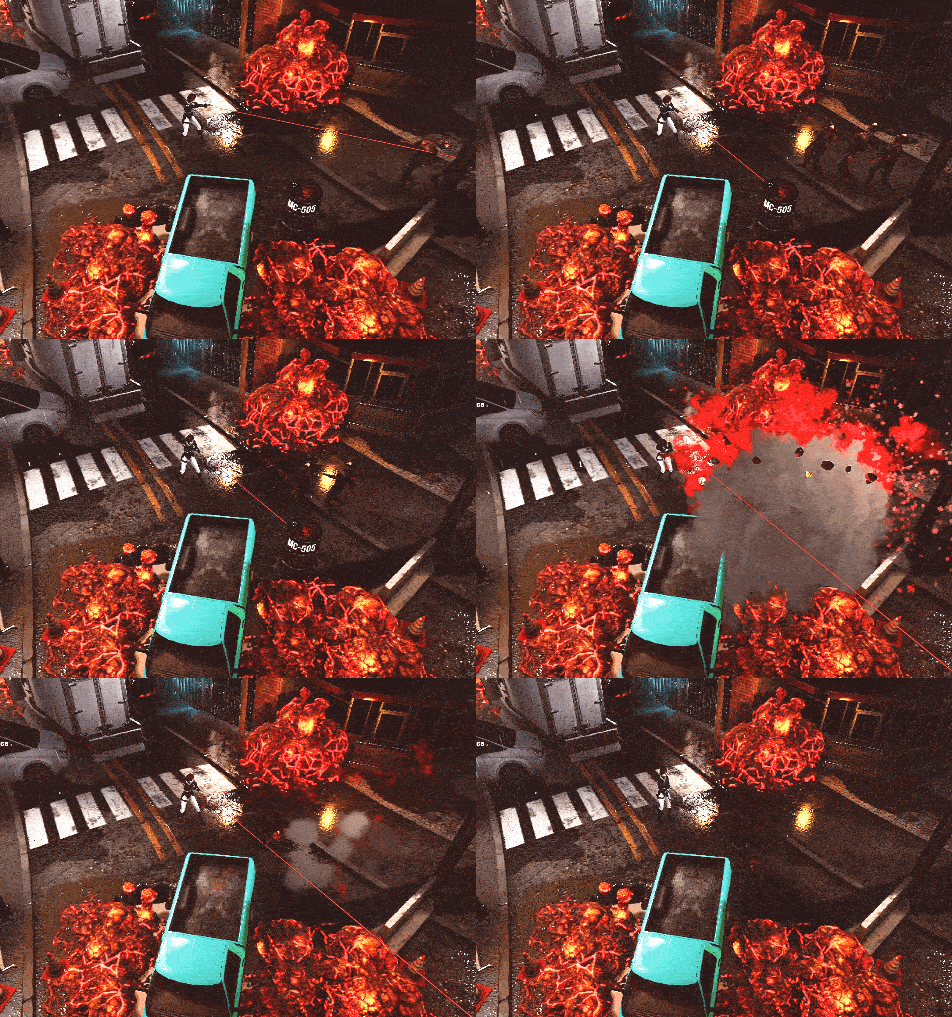
Explosive barrels provide a nice opportunity to save ammo at the cost of losing points
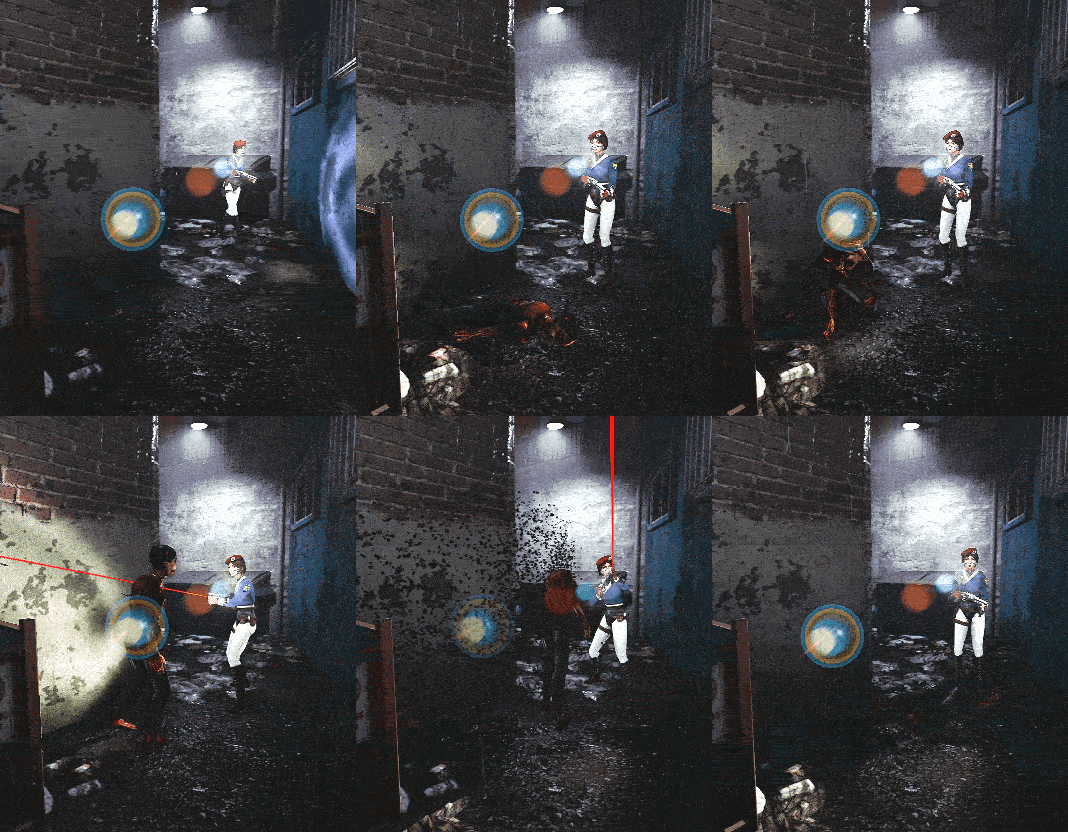
Surprise!
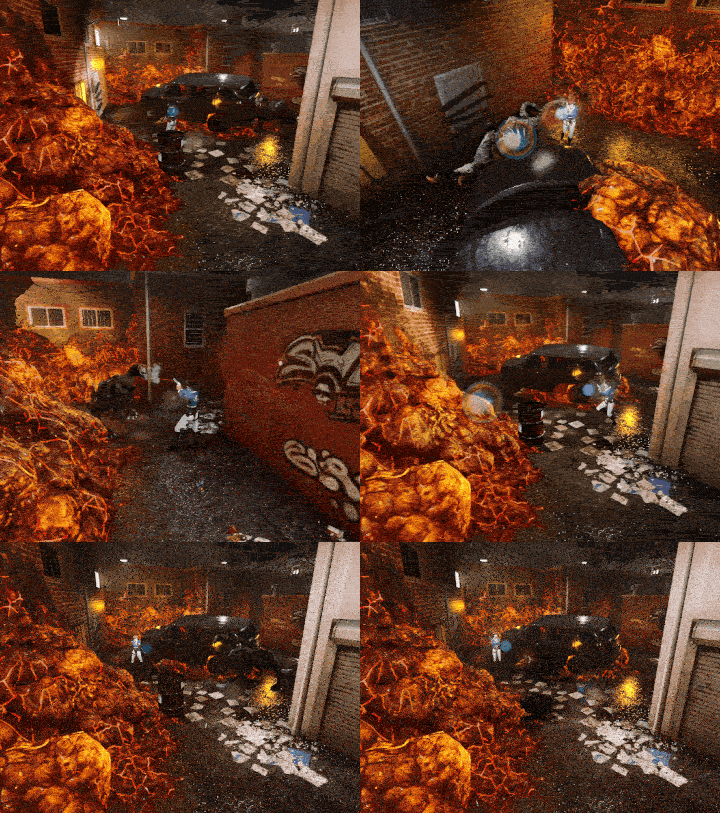
Fighting the Dog Cluster boss
Exploration & Secrets
A great survival horror game has lots of exploration. I primarily facilitated this with the non-linear branching layout (explained above), but I also placed many secrets in the level as well.
Secrets come in the form of hidden camera angles that show off new areas in the environment, optional inspect text that improves worldbuilding, and even hidden item caches. I love secrets in games, and I think they provide a nice payoff to the player for investing the time into exploring the environment(s).
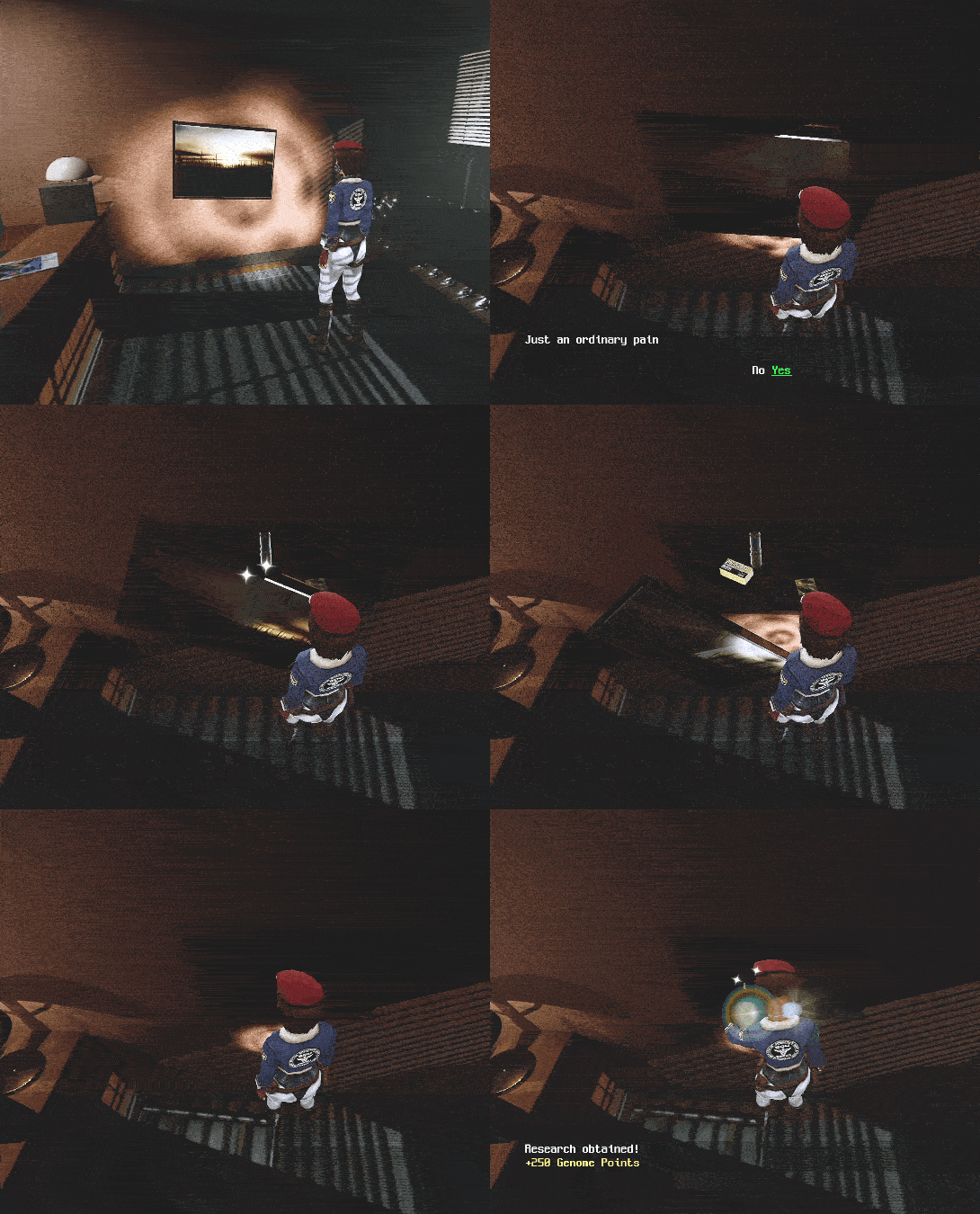
Goodies hidden behind a painting
Puzzles & Scripting
As the Lead Level Designer, I took on much of the level scripting duties for the project, with Gamcheon Village being no exception. Pretty much all of the scripting in the level is done through Unreal's Blueprint system, and I primarily used it to trigger contextual enemy encounters (see above), drive the logic for various puzzles, manipulate the UI map, activate cutscenes, handle much of the difficulty-specific logic, and even trigger contextual achievements.
I worked together with the Game Director & Programmer to create custom actor classes, Blueprint nodes, and other systems that I needed to achieve the desired results.
I also constructed Blueprint logic to retain states across level transitions, so that what a player does in one level can affect another, and much of the level's optimization pipeline is also routed through Blueprints as well.

Changing the solution of a keypad based on game difficulty level using custom BP nodes

Marking a point of interest on the map UI
————————————————————————————————————————————————————————————————
Video Walkthrough